Pywal and Sway Dynamic Window Decorations from Your Wallpaper
I am always fiddling around with wallpapers, themes, backgrounds and the like, so it was only a matter of time before I wanted my Sway window decorations to actually match my wallpaper rather than the same static Nord palette I have been staring at for years.
Don't get me wrong, Nord is great, and it has served me well, but once you start using pywal to generate colour palettes from your wallpaper, having your terminal, GTK apps, and waybar all shift to match while those window titlebars sit there in stubborn #434c5e starts to feel, well, a bit disjointed.
So I did what any self-respecting tiling WM user would do: I made them obey pywal too.
I already had pywal running on wallpaper change via a simple script, and my Sway config had the usual hardcoded client.focused and friends in config.d/theme:
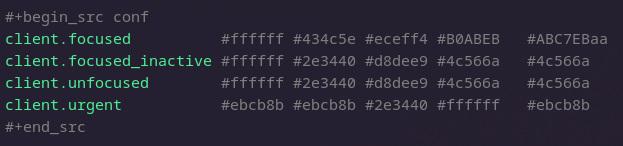
That is five colour fields per line, by the way – border, background, text, indicator, and child_border – and I was setting them all to pre-selected Nord values that never changed no matter how leafy or dark my wallpaper was.
I ended up with a two-layer solution because colours need to work at two different times:
- On Sway start or reload – the config file needs the right colours baked in from the start.
- On wallpaper change – colours need to update live without restarting Sway.
Pywal supports custom templates. You drop a file in ~/.config/wal/templates/ with placeholder variables like {foreground}, {background}, {color1} etc, and pywal expands them when it runs. The output lands in ~/.cache/wal/ with the same filename.
So I created ~/.config/wal/templates/sway:
# Pywal-generated colors for Sway
client.focused          {foreground}  {background}  {foreground}  {color5}  {color6}
client.focused_inactive {color8}      {background}  {color8}      {color4}  {color4}
client.unfocused        {color8}      {background}  {color8}      {color4}  {color4}
client.urgent           {color1}      {color1}      {background}  {foreground}  {color1}
The mapping is fairly intuitive: focused windows get the foreground colour for borders and text with a subtle accent on the indicator, while unfocused ones drop back to a muted color8 so they sit quietly in the background. Urgent windows invert and use color1 (the red-ish accent) as the dominant colour.
Then I added one line to config.d/theme:
include ~/.cache/wal/sway
Now every time I reload Sway (Mod4+o, in my setup), it picks up whatever pywal's current palette is. No more Nord-by-default.
Sway reload is fine for a one-off, but I change wallpapers pretty regularly (bound to Mod4++) and I want the colours to shift immediately. Enter swaymsg.
My wallpaper_change.sh script already ran pywal and set the wallpaper, so I just needed it to also poke the window decoration colours at runtime. The critical bit:
# Load colors from pywal
colors=$(cat ~/.cache/wal/colors.json)

fg=$(echo $colors | jq -r '.special.foreground')
bg=$(echo $colors | jq -r '.special.background')
c1=$(echo $colors | jq -r '.colors.color1')
c4=$(echo $colors | jq -r '.colors.color4')
c5=$(echo $colors | jq -r '.colors.color5')
c6=$(echo $colors | jq -r '.colors.color6')
c8=$(echo $colors | jq -r '.colors.color8')

# Update sway window decorations
swaymsg client.focused          "$fg" "$bg" "$fg" "$c5" "$c6"
swaymsg client.focused_inactive "$c8" "$bg" "$c8" "$c4" "$c4"
swaymsg client.unfocused         "$c8" "$bg" "$c8" "$c4" "$c4"
swaymsg client.urgent            "$c1" "$c1" "$bg" "$fg" "$c1"
The order of those five arguments to swaymsg client.focused is: border, background, text colour, indicator colour, child_border colour. It matches the Sway config format exactly, so I kept the same mapping I used in the template.
Now when I flip to a warm, earthy wallpaper, my window borders warm up too. Dark wallpapers give dark, moody borders. It is a small thing, but it makes the whole desktop feel coherent in a way that partial theming never quite achieves.
And because the template and the swaymsg calls share the same colour mapping, everything stays in sync regardless of whether the colours were loaded at Sway startup or pushed live mid-session.
If you are already running pywal with Sway, this is about ten lines of config and a tiny template. Well worth the five minutes.
The full dotfiles are at github.com/captainflasmr/dotfiles, and as always, I will probably tweak the colour assignments as different wallpapers expose edge cases!