The Hidden Git Stash Keys in Emacs VC Directory Mode
My ongoing journey with vc-dir and vc-mode led me into wanting to delete a stash (not to pop). There are "z" keybindings in vc-dir:
z c	vc-git-stash
z p	vc-git-stash-pop
z s	vc-git-stash-snapshot
but what about delete?, and are there any others?
In vc-dir you get a rather nice little Stash section tacked on at the bottom listing all your stashes:
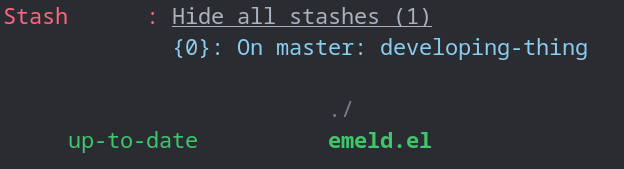
I genuinely assumed I was missing something obvious, so I did the sensible Emacs thing and hit C-h m to describe the mode, scrolled through the whole keymap, and, nothing about stashes at all.
Well how about C-h b (describe-bindings)?, initially nothing!, however I stumbled on a solution, if the point is on a stash name, the following is exposed!
C-k	vc-git-stash-delete-at-point
RET	vc-git-stash-show-at-point
=	vc-git-stash-show-at-point
A	vc-git-stash-apply-at-point
C	vc-git-stash
P	vc-git-stash-pop-at-point
S	vc-git-stash-snapshot
Surprisingly difficult to find.
and C-k does obviously seem a natural fit to delete a stash, but what wasn't obvious was the fact that the point had to be on the stash name.
I couldn't quite understand why these keybindings were so difficult to find, so I went digging into vc-git.el and there it was, the bindings are not part of vc-dir-mode-map at all, they live in their own little keymap:
(defvar-keymap vc-git-stash-map
  :parent vc-git-stash-shared-map
  "<down-mouse-3>" #'vc-git-stash-menu
  "C-k"            #'vc-git-stash-delete-at-point
  "="              #'vc-git-stash-show-at-point
  "RET"            #'vc-git-stash-show-at-point
  "A"              #'vc-git-stash-apply-at-point
  "P"              #'vc-git-stash-pop-at-point)
And the crucial detail, this keymap is not installed as the major mode map, it is slapped directly onto the stash lines as a keymap text property when those lines are rendered. So the bindings are only live when point is literally sitting on a stash, which is rather elegant actually, but it does mean describe-mode never sees them, because C-h m only reports the major mode's own keymap, and a text-property keymap is invisible to it. That explained my confusion completely, I was not going mad after all!
And the Emacs manual, well I did have a little look but found nothing. It seems these keybindings are almost impossible to find, but now I have found them this blog post should help me to remember.
So, lesson learned, and a genuinely useful one I think, C-h m is not the whole story. When a mode renders interactive regions, buttons, clickable lines, embedded widgets, those often carry their own text-property keymaps that describe-mode will never show you, and the move in those situations is C-h k or C-h b with point actually on the thing.
Anyway, C-k on a stash line to drop it, that is the headline, write it on a sticky note, you will want it eventually!, if you are a vc-mode user of course, I suspect that magit has this very discoverable already through the stash menu.